How to Make a Burning Bridges AI Video (Step by Step)
Make your own Burning Bridges AI video from one photo. Pick 15 or 29 seconds, 480p or 720p, then post it on TikTok or Reels with the Burning Bridges sound.
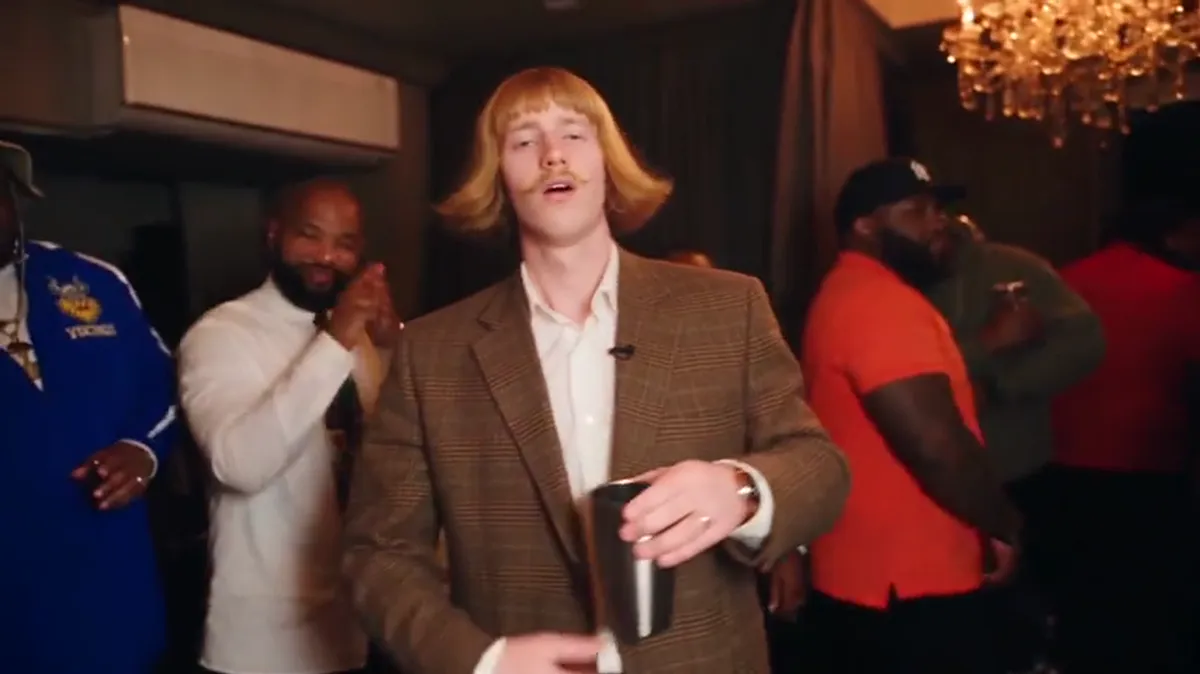
To make a Burning Bridges AI video, upload one clear photo to a Burning Bridges AI video generator, pick a length, and download the finished clip about 10 minutes later. On Burning Bridges AI a 15-second video uses 100 credits and the full 29-second scene uses 300 credits. You do not need an editing app, a reference video or a prompt.
This guide walks through each step, the photo that gives the best result, and how to post the video so it lands on the trend's sound page.
What do I need before I start?
You need three things:
- One photo. Yourself, a friend who said yes, or your pet. One person or one animal per photo.
- Credits. Packs start at $9.99 for 100 credits. There is no subscription.
- A TikTok or Instagram account if you want to post it with the Burning Bridges sound.
That is the whole list. The party room, the crowd, the chandeliers and the handheld camera moves come from the template, so you do not set any of that up yourself.
Step 1: Upload one photo
Open the generator and drop in your photo. JPG, PNG and WebP work, up to 10 MB.
The photo decides most of the result. Use one where:
- the face is fully visible and looks roughly toward the camera,
- the light is even, so there are no deep shadows across the face,
- only one person or one pet is in the frame,
- there are no sunglasses and no heavy beauty filter.
A full-body or half-body shot is fine. You do not need a separate face close-up. Group photos give the weakest results, because the AI has to guess which face you mean.
Only upload photos of yourself, your pets, or people who gave you permission. That rule is part of the terms and the account gets closed if it is broken.
Step 2: Pick 15 seconds or the full 29 seconds
| Length | What you get | Credits |
|---|---|---|
| 15 seconds | The best-known part of the party scene | 100 |
| Full 29 seconds | The whole party scene from start to finish | 300 |
Both versions are landscape 16:9, the same shape as the original clip from Drake's Burning Bridges music video. Most people post the 15-second version, because that is the part viewers already recognize.
Step 3: Pick 480p or 720p
| Quality | Best for | Credits |
|---|---|---|
| 480p | TikTok, Reels and Stories on a phone | 100 (15 s) or 300 (29 s) |
| 720p HD | YouTube, X, or watching on a laptop or TV | 200 (15 s) or 600 (29 s) |
480p looks sharp on a phone screen, and phones are where this trend lives. Choose 720p if you plan to post somewhere people watch on bigger screens.
Step 4: Add friends or a new room (optional)
Under More options you can add up to 5 more photos. Each one replaces one person in the crowd, in the order you upload them. You can also upload a photo of a place, and the AI restyles the room to match while the moves and camera stay the same. Both options are in beta. Extra photos do not cost extra credits.
This is how people make themed versions, such as a 1920s gang look with the whole crew in flat caps, or a chemistry teacher look in a lab-style room.
Step 5: Watch the preview, then download
When the video is ready, the preview on the site plays with the original audio so you can check the timing of the moves against the song.
The file you download is silent. That is on purpose: you add the sound inside TikTok or Instagram when you post, which is also how your video shows up on the trend's sound page. The full walkthrough is in How to add the Burning Bridges sound on TikTok and Instagram.
Step 6: Post it with the Burning Bridges sound
- Upload the MP4 to TikTok or Instagram Reels.
- Open the music or sound picker and search for "Burning Bridges".
- Pick the sound and line it up with the start of the clip.
- Turn on the AI-generated content label. TikTok, Instagram and YouTube ask creators to label AI video.
If you add music in an editing app instead, you need the right to use that music.
How long does it take?
Most videos are ready in about 10 minutes after you press generate. You can leave the page open and come back.
What if the result looks wrong?
If a generation fails for a technical reason, the credits go back to your account automatically and you can try again. If the face looks off, the fix is almost always the photo: try a sharper one, facing the camera, in better light.
FAQ
Do I need to write a prompt to make a Burning Bridges AI video? No. The scene, the crowd and the camera moves are already set up. You upload a photo and choose a length. If you are curious how prompts work for this trend in other tools, read Burning Bridges AI prompt: what to write.
Can I use a photo of my dog or cat? Yes, pet photos are accepted. Use a sharp photo where the face is fully visible.
Is there a free way to make it? You can try a general AI video app with a free quota, but you have to find the reference video, write the prompt and retry until the moves and lip sync match. This generator is paid, from $9.99. See Is there a free Burning Bridges AI video generator?
Is this tool made by Drake? No. Burning Bridges AI is an independent tool and is not affiliated with Drake or his record labels. For the background of the trend, read The Burning Bridges AI trend explained.
Ready to try it? Upload your photo.